Quick Answer
Automated bookkeeping tools and AI-driven software can handle basic data entry, but they don’t understand your business operations, industry nuances, or U.S. tax law. That gap shows up as misclassified transactions, missed deductions, and cleanup work that costs more than doing it right the first time. AI is a useful tool — it isn’t a substitute for a bookkeeper who knows how to read your books in context.
Jenny Rodriguez, founder of Anchor Bookkeeping & Tax Solutions, spends a good portion of her week on cleanup work. Not because business owners are careless with their books — but because the automated software they trusted to “handle it” quietly got things wrong for months before anyone noticed. In a recent video, Jenny walks through exactly where AI bookkeeping tools fall short, and why the fix usually requires a human who understands both the software and the tax code behind it.
Most of Our Cleanup Work Exists Because of AI, Not In Spite of It
It’s a pattern Jenny sees constantly: a business owner signs up for an automated bookkeeping tool, the software starts categorizing transactions on its own, and everything looks fine — until tax time, or until a lender asks for financials, or until Jenny opens the books for a cleanup engagement. A large share of that cleanup work isn’t fixing what a business owner did wrong. It’s correcting errors the automated system introduced and never flagged.
That’s not a knock on automation itself. It’s a reminder that “automated” and “accurate” aren’t the same thing.
Automated Systems Don’t Know Your Business
AI-driven bookkeeping tools are built to handle basic, repeatable tasks — matching a bank transaction to a category, reconciling a balance, flagging a duplicate. What they can’t do is understand the internal nuances of how a specific business actually operates, or how U.S. tax law applies to the industry that business is in.
A construction company and a real estate investor might have transactions that look similar on a bank statement but need to be categorized completely differently for tax purposes. Software doesn’t know the difference. A person who understands your business does.
The Waterbean Problem: How Misclassification Actually Happens
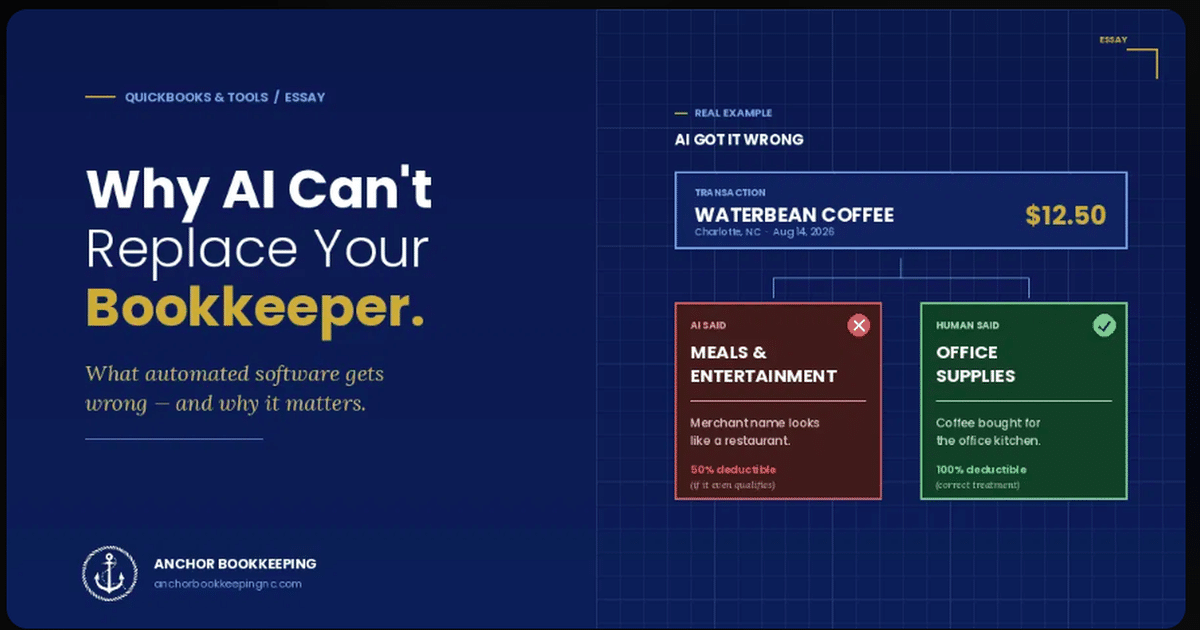
Jenny uses a simple, real example to illustrate the risk: a transaction from a merchant called “Waterbean.” To an automated system scanning for keywords, “bean” reads close enough to a coffee shop or restaurant, so the software categorizes it as a meal expense. It doesn’t matter what the transaction was actually for — the software matched a pattern, not a purpose.
Multiply that one mistake across a year of transactions, and across every vendor name that happens to sound like something it isn’t, and the books start telling a story that has nothing to do with what actually happened in the business.
Why a Miscategorized Transaction Is More Than a Typo
A transaction filed under the wrong category isn’t just a cosmetic issue. Meals and entertainment expenses, for example, are treated very specifically under tax law — and getting that classification wrong can go two directions, both costly:
- Legitimate expenses get buried in the wrong category and the business misses deductions it was entitled to.
- Expenses get claimed incorrectly, which creates exposure if the business is ever reviewed by tax authorities.
Either way, the business owner finds out long after the transaction happened, when there’s far less room to fix it cleanly.
AI Is a Tool. It’s Not a Replacement for Expertise.
None of this means automation is bad — Anchor uses QuickBooks Online and plenty of automated features every day. The point Jenny makes is about role, not tools: software can speed up data entry, but it can’t replace a professional who understands U.S. tax law, knows how to read a business’s specific financial picture, and catches the kind of error that a keyword-matching system will never flag on its own.
That’s the gap Anchor Bookkeeping fills. Whether it’s a full cleanup of books that automated software has been quietly mismanaging, catch-up work to get a backlog current, or setting up workflows from the start so those errors don’t happen in the first place, the goal is the same — books that are actually accurate, not just automatically categorized.
FAQ
Is automated bookkeeping software bad for my business?
No — tools like QuickBooks Online are valuable for speeding up routine tasks. The issue is relying on automation alone to categorize transactions correctly without any human review, especially around tax-sensitive categories.
How would I know if my books have misclassified transactions?
The most common way is a cleanup review, where a bookkeeper goes through transaction history line by line and compares categorization against what the transaction actually was, not just what the merchant name suggests.
Can this affect my taxes even if I haven’t filed yet?
Yes. Misclassified transactions throughout the year directly affect what shows up on your tax return, which can mean missed deductions or incorrectly claimed ones — both of which are easier to fix before filing than after.
Not sure what your books actually say?
About the Author
Jenny Rodriguez is the founder of Anchor Bookkeeping & Tax Solutions, a QuickBooks Platinum ProAdvisor with over 10 years of experience helping construction contractors, real estate investors, and small businesses keep accurate, tax-ready books.
This article is for general informational purposes and does not constitute tax or legal advice. Every business’s situation is different — consult a qualified professional before making financial decisions.
Browse Resources by Topic
Reach Out for Expert Guidance
Contact Anchor Bookkeeping and Tax Solutions today for tailored support in managing your financial needs. Our team is ready to provide personalized assistance to help you achieve your financial goals.